 mind3D
Your thoughts stay yours
Mind maps often hold the most personal things: plans, ideas, diaries, work. mind3D protects them in two stages. The basic protection is always on and costs no convenience. If you want more, switch on encryption.
Always on, for everyone
📴Fully offline
mind3D loads nothing from the internet and sends nothing there. The Android app does not even have the permission to.
🚫No trackers
No account, no ads, no analytics services. Checked: 0 of 432 known trackers.
☁️No cloud copy
App data ends up neither in the Google backup nor in the transfer to a new phone. Only what you export yourself is backed up.
📍Images without traces
GPS position, camera data and other hidden information is removed from images when inserting, importing and exporting.
🧪Checked imports
Every imported file is checked before opening. Manipulated mind maps cannot inject code.
🧱Sealed off
mind3D only shows its own pages, links open in the browser. The PC version runs on a current, hardened base (Electron 44).
Encryption at the push of a button
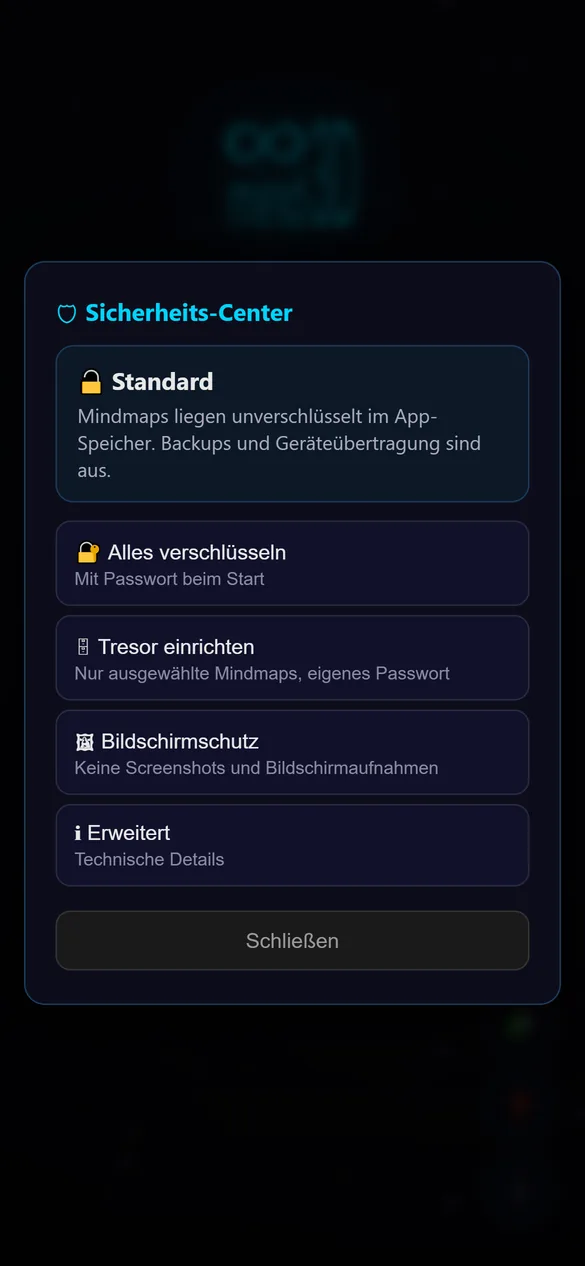
On the start screen under 🛡. A wizard guides you through three steps: choose a password, write down the recovery words, enter three words as a check.
🔐 Encrypt everything
All mind maps and even their names are encrypted. On Android, mind3D unlocks automatically via your phone’s security chip, on PC with your password.
🗄 Vault
Only selected mind maps go into a tab of their own with a separate password. The vault locks after an adjustable time and as soon as you leave the app.
What else is included
📝Recovery words
24 words as a spare key in case you forget your password or switch devices. Write them down or store them in a password manager such as KeePass. The app spots typos immediately.
📦Encrypted export
Exports stay encrypted as .m3e. For sharing there is a separate export password. Modified or damaged files are detected.
👆App lock
mind3D only opens with your fingerprint, face or your phone’s screen lock (Android).
🖼Screen protection
No screenshots or screen recordings, hidden preview in the app overview.
👁Protection from snooping apps
From Android 14, other apps with accessibility rights cannot see your content. TalkBack keeps working.
⌨️Keyboard doesn’t learn along
Password and word fields have no suggestions and no autocorrect.
💽Encrypted backups
With encryption on, automatic backups are encrypted too and old unencrypted copies are deleted.
🔄Safe switch-over
If switching encryption on or off is interrupted, mind3D continues at the next start. Every mind map is checked afterwards.
⚠️Notice on rooted devices
On rooted or modified devices, mind3D points out once that protection is weaker there.
Technology and testing
| Area | Implementation |
|---|---|
| Encryption | AES-256-GCM, a separate key for every mind map (HKDF-SHA-256), bound to its storage location |
| Passwords | Argon2id with 64 MiB of memory, so guessing becomes very expensive |
| Device key | Android Keystore in the security chip (TEE, StrongBox where available); the key never leaves the chip |
| Recovery | 24 words according to BIP39 (256 bits with checksum) |
| Guidelines | Methods according to BSI TR-02102-1; self-assessment according to OWASP MASVS |
| Automated scan | MobSF: 96 of 100 points, no trackers |
| Libraries | checked against the osv.dev database: no known vulnerabilities |
mind3D has no official security certification. The details describe which guidelines it was built to and how it was tested in-house.
Frequently asked questions
What happens if I forget my password?
You reset it with your 24 recovery words. Without the password and without the words, nobody can access the encrypted mind maps any more, not even the developers. So keep the words safe.
Do I have to switch on encryption?
No. The basic protection always applies. Encryption is worth it if others could get hold of your device or if your content is very personal.
Why don’t I need a password on Android?
With “Encrypt everything”, the key lives in your phone’s security chip and is only released on the unlocked device. For extra protection there is the app lock with fingerprint or the vault with its own password.
Can I take encrypted mind maps to a new device?
Yes. Export them as .m3e and open them on the new device. mind3D will ask for your recovery words there.
How do I report a security vulnerability?
By email to mind3D.dev@gmail.com with the subject “Security”. Reports are treated confidentially; details are only published after a fix.
Planned
- End-to-end encryption for shared mind maps, once sharing with others arrives. Shared mind maps will then always be encrypted.
- Signed PC version with a check whether the program files have been modified
- Regular security updates of the PC base and the libraries
- External security audit before major versions